
Let’s be honest: Google Analytics 4 (GA4) can sometimes feel like trying to solve a Rubik’s cube in the dark. While it’s incredibly powerful for tracking overarching traffic trends, it doesn’t always give you the immediate, visual insights you need to figure out why users aren’t converting on your website.
The good news? You don’t need a massive enterprise budget to bridge the gap.
If you want to understand your audience, optimize your conversion rates, and build cleaner reports without drowning in a sea of complex menus, add these five completely free analytics tools to your tech stack today.
Microsoft Clarity: The Ultimate Behavior Tracker
If you’ve ever wished you could sit over your users’ shoulders to watch how they navigate your site, Microsoft Clarity is the next best thing.
- What it does: It provides free, GDPR-compliant heatmaps and session recordings.
- Why you need it: GA4 might tell you that 70% of users drop off on your landing page, but Clarity will show you why. You can watch actual playbacks of user sessions to spot “rage clicks” (where users tap a broken button repeatedly) or dead clicks that are killing your conversions.
- The best part: Unlike similar tools (like Hotjar), Clarity has no traffic limits on its free tier.
Looker Studio: Turn Messy Data into Stunning Dashboards
Data is only useful if your team—or your clients—can actually understand it. Looker Studio (formerly Google Data Studio) is Google’s free data visualization tool.
- What it does: It connects directly to GA4, Google Ads, Search Console, and YouTube to turn raw data into highly visual, easy-to-read charts.
- Why you need it: Instead of logging into three different platforms to check campaign performance, you can build a single, automated dashboard. Once it’s set up, it updates in real time, saving you hours of manual reporting every month.
Google Search Console: Your Organic Search Truth
While technically part of the Google ecosystem, Search Console (GSC) is criminally underutilized by marketers who rely solely on standard analytics.
- What it does: It monitors, maintains, and troubleshoots your site’s presence in Google Search results.
- Why you need it: GA4 shows you what people do after they arrive at your site. GSC tells you exactly what they searched for before they clicked. It reveals your exact keyword rankings, click-through rates (CTR) from search engine results pages, and any indexing errors holding your SEO back.
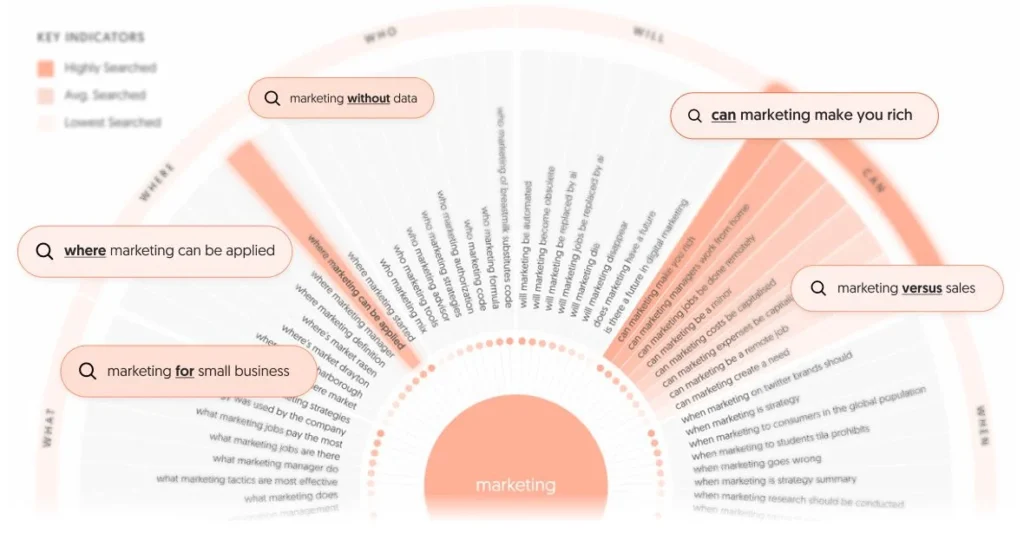
Answer The Public: Content Demand Analytics
Analytics isn’t just about looking backward at past traffic; it’s also about analyzing future content opportunities.
- What it does: It maps out the exact questions, comparisons, and search queries people are typing into search engines regarding any specific topic.
- Why you need it: If you want your content marketing to be data-driven, you need to know what your audience is actively looking for. AnswerThePublic gives you a goldmine of raw search intent data, perfect for planning blog topics and answering customer pain points.
Similarweb (Free Extension): For Keeping Tabs on Competitors
You can’t optimize your own strategy without understanding the competitive landscape. The free Similarweb browser extension gives you a snapshot of any competitor’s traffic data.
- What it does: It provides estimated insights into a competitor’s total monthly traffic, traffic sources (search, social, direct), and top referring countries.
- Why you need it: If a competitor is suddenly eating your market share, you can use this tool to see if they’re leaning heavily into paid search, growing their organic reach, or getting a massive amount of referral traffic.